;stroke-width:2.11667;stroke-miterlimit:2;paint-order:stroke%20fill%20markers;fill-opacity:1'/%3e%3cg%20style='fill:url(%23g)'%3e%3cg%20style='fill:url(%23h)'%3e%3cpath%20d='M23.156%2019.14c-6.862%200-7.634%207.671-16.1%207.671H0v1.411h16.933c7.056%200%2011.246-1.498%2011.246-5.026%200-2.116-2.2-4.056-5.023-4.056'%20style='display:inline;fill:url(%23h);fill-opacity:1;stroke-width:2.11667;stroke-miterlimit:2;paint-order:stroke%20fill%20markers'/%3e%3cpath%20d='M16.933%205.645c-7.055%200-10.946%201.41-10.945%204.938%200%202.117%202.422%204.404%205.244%204.404%208.467%200%206.837-7.932%2022.635-7.932v-1.41Z'%20style='display:inline;fill:url(%23h);fill-opacity:1;stroke-width:2.11667;stroke-miterlimit:2;paint-order:stroke%20fill%20markers'/%3e%3cpath%20d='M33.867%209.878c-8.27%200-11.8%202.584-13.959%205.733%204.366.306%2011.137%201.662%2011.137%207.672%200%207.761-11.29%207.762-14.112%207.762H0c0%201.41%201.411%202.822%202.822%202.822H17.64c11.289%200%2016.228-4.234%2016.228-9.878z'%20style='stroke-width:2.11667;stroke-miterlimit:2;paint-order:stroke%20fill%20markers;fill:url(%23h)'/%3e%3cpath%20d='M0%209.878v14.11c6.972-.108%2011.484%201.547%2015.326-5.664-4.125-.128-12.504-1.054-12.504-7.74%200-7.762%2011.29-7.762%2014.111-7.762h16.934c0-1.41-1.411-2.822-2.823-2.822H16.228C4.938%200%200%204.233%200%209.878'%20style='stroke-width:2.11667;stroke-miterlimit:2;paint-order:stroke%20fill%20markers;fill:url(%23h)'/%3e%3c/g%3e%3c/g%3e%3c/g%3e%3c/svg%3e)
Notes that float above everything else.
Slip Switch sits on top of your other windows, so what matters stays in view while you work in something else.
Slip Switch is a small, always-on-top note-taking app that sits beside your work.
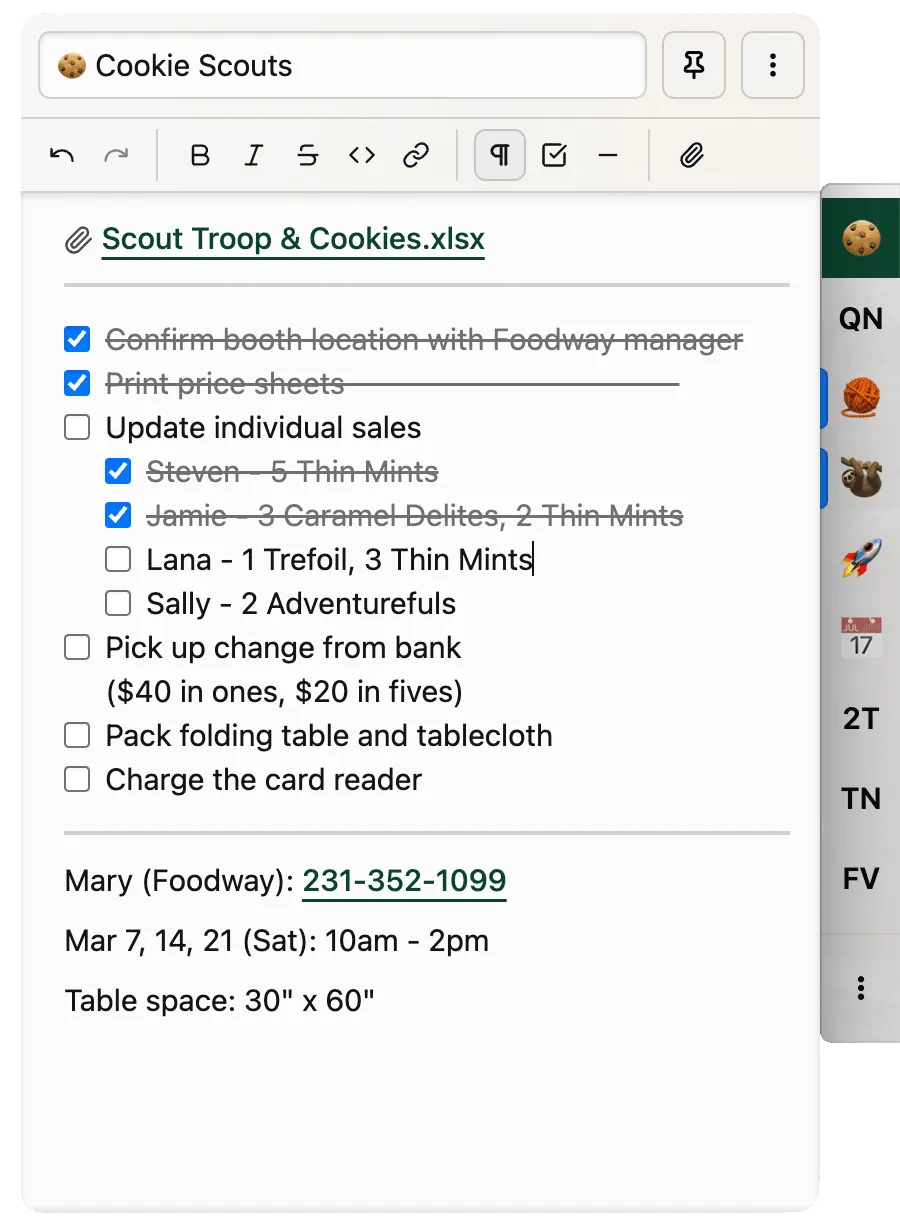
Slip Switch sits on top of your other windows, so what matters stays in view while you work in something else.
Each track is a standalone Markdown note in the launcher. Switch contexts without losing your place.
A small colored bar on a tab marks open todos or a periodic reminder. Stay on task with less anxiety.
It’s just Markdown. No cloud, no accounts, no data collection. Sync them via Dropbox or iCloud yourself, or don’t.
[ ] checkboxes, with optional strike-through on done.